Difference between revisions of "Template:Grid/Canning Machine"
m (Potential facepalm) |
m (Back to basics) |
||
| Line 3: | Line 3: | ||
<div style="left:0px; top:0px; width:288px; height:210px; position:relative;"> | <div style="left:0px; top:0px; width:288px; height:210px; position:relative;"> | ||
{{#if:{{{input-tank|}}}|{{FluidGauge|left=77|top=92|width=24|height=94|max=10000|fill={{{input-fill|0}}}|tank={{{input-tank|}}}|link= | {{#if:{{{input-tank|}}}|{{FluidGauge|left=77|top=92|width=24|height=94|max=10000|fill={{{input-fill|0}}}|tank={{{input-tank|}}}|link=User:Chocohead}}|<div style="left:77px; top:92px; position:absolute; width:24px; height:94px;">[[Image:Tank Empty.png|24px|link=|alt=]]</div>}} | ||
<!-- ^ Input (Left) Tank --> | <!-- ^ Input (Left) Tank --> | ||
{{#if:{{{output-tank|}}}|{{FluidGauge|left=233|top=92|width=24|height=94|max=10000|fill={{{output-fill|0}}}|tank={{{output-tank|}}}|link={{{output-tank-link|}}}}}|<div style="left:233px; top:92px; position:absolute; width:24px; height:94px;">[[Image:Tank Empty.png|24px|link=|alt=]]</div>}} | {{#if:{{{output-tank|}}}|{{FluidGauge|left=233|top=92|width=24|height=94|max=10000|fill={{{output-fill|0}}}|tank={{{output-tank|}}}|link={{{output-tank-link|}}}}}|<div style="left:233px; top:92px; position:absolute; width:24px; height:94px;">[[Image:Tank Empty.png|24px|link=|alt=]]</div>}} | ||
Revision as of 16:03, 24 September 2014

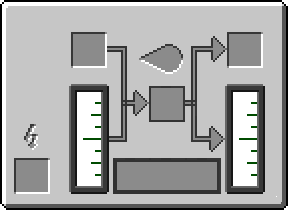
This template is used to create a machine GUI that looks similar to the Canning Machine's GUI screen.
Usage[edit]
{{Grid/Canning Machine
|mode=D
|can=Empty Cell
|input-tank=Distilled Water
|input-fill=1000
|input=Lapis Lazuli Dust
|output=Coolant Cell
|output-tank=Coolant
|output-fill=1000
|battery=RE Battery (Charged)
}}
makes:






Link=
Link=|link=
Additional Usage Information[edit]
Tanks[edit]
The tanks in the canning machine template are cutting edge technology, only for IC2 - HAYO!
As you can see in the example above, a tank needs to fields to be set - the input/output-tank and input/output-fill.
The -tank is what fluid should be in the tank. The currently available fluids are Water, Distilled Water and Coolant, but more can be added if necessary.
The -fill changes how much fluid is in the tank, and is measured in milli-buckets. The maximum value is 10000, although larger values can be entered, they will just show the tank as full.
Mode[edit]
There are 4 modes that the canning machine can be in: Canning, Fill Cell from Tank, Fill Tank from Cell and Fluid Enrich. In order to keep making the template simpler, those 4 modes (in that order) are A, B, C and D. By default, the canning machine uses mode A (Canning).
{{Grid/Canning Machine
}}
|
{{Grid/Canning Machine
|mode=A
}}
|
{{Grid/Canning Machine
|mode=B
}}
|
{{Grid/Canning Machine
|mode=C
}}
|
{{Grid/Canning Machine
|mode=D
}}
|
|
Link=
Link=|link=
|
Link=
Link=|link=
|
Link=
Link=|link=
|
Link=
Link=|link=
|
Link=
Link=|link=
|






Alternative Names[edit]
The template is flexible: left can be used instead of can, middle can be used instead of input and right be used instead of output.
As with the newer templates, -link can be added to change where an item links to (such as Iron going to Non-IC Items). This works for the tanks as well as the items.
Adding IA will allow to number of items in the input/middle slot to be shown.
{{Grid/Canning Machine
|mode=D
|input-tank=Water
|input-fill=1000
|input-tank-link=Non-IC Items
|input=Lapis Lazuli Dust
|IA=8
|output-tank=Coolant
|output-fill=1000
|output-tank-link=Coolant (Fluid)
|battery=RE Battery (Charged)
}}
makes:

Link=
Link=|link=
Note[edit]
When uploading images for this, or any other template, (if they are missing) then the following standard is used:
Grid_item name.png -- A 32x32 image of the item as it appears in a player's inventory.
If a new fluid texture is needed, you should see Chocohead, as the way to make them is a little strange ;)
See also[edit]
{{Grid/Machine}}
The above documentation is transcluded from Template:Grid/Canning Machine/doc. (edit | history)